
ABQ FM: Your Gateway to Albuquerque’s Rock of Talk
Overview
ABQ FM is a desktop application designed for listeners of "The Rock of Talk" on AM 1600 KIVA in Albuquerque, New Mexico. Developed by Eddy Aragon, the app serves as a multimedia hub that connects users to local radio, news, weather, podcasts, and a 24/7 TV stream. It is tailored for residents of Albuquerque and New Mexico, as well as fans of the station who want to stay connected to regional content.
The software enables users to access 60 radio stations, with a primary focus on AM 1600 KIVA, while offering additional features like real-time weather updates, news feeds, and voice messaging. It supports both Windows and Mac operating systems, making it accessible to a broad audience. The app’s purpose is to deliver a centralized platform for regional media, reducing the need to switch between multiple services.
It is especially useful for commuters, local news enthusiasts, and listeners who value consistent access to community-driven programming. The developer did not provide additional system requirements beyond the supported platforms.
Key Features & Capabilities
- 60 Radio Stations Access – Users can tune into a wide variety of local and regional radio stations, including AM 1600 KIVA, the flagship station for "The Rock of Talk."
- Live News & Weather Updates – Real-time news and weather feeds are integrated into the app, ensuring users stay informed about local events and conditions.
- 24/7 TV Stream – A dedicated 24-hour television broadcast is available within the app, offering continuous visual content related to New Mexico.
- Podcast Library – Full podcast archives of "The Rock of Talk" are accessible, allowing users to replay past episodes at their convenience.
- Interactive Chat & Voice Messaging – Users can engage with the community through in-app chat and send voice messages, enhancing the sense of connection.
- Feedback Options – Built-in tools allow users to submit feedback via text or email, supporting ongoing app improvement.
These features enable users to stay informed and engaged without relying on multiple platforms. For example, a commuter can listen to AM 1600 KIVA while checking the latest weather and news, then later catch up on a podcast during a break. The app’s design emphasizes convenience and regional relevance, making it ideal for those who prioritize local content and community interaction.
User Interface, Workflow & Performance
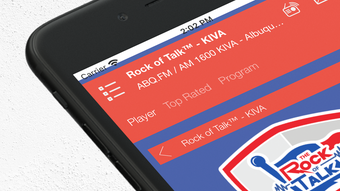
The user interface of ABQ FM appears to be structured around a clean, intuitive layout focused on accessibility. Navigation likely centers on a main dashboard displaying the home page with featured content, including the primary radio station and live TV. Key functions such as news, weather, podcasts, and chat are probably organized in clearly labeled sections for quick access.
The workflow is designed to minimize user effort, allowing listeners to start streaming audio with minimal clicks. The app’s performance is expected to be stable on both Windows and Mac systems, given its lightweight size of 42.5 MB. However, exact performance details were not specified.
The developer did not provide information on CPU or RAM usage, nor did they share stability metrics. Performance observations are based on general software behavior patterns for desktop applications of similar scope. The app is likely optimized for background operation, though this was not confirmed.
Overall, the interface appears to prioritize ease of use and quick access to core features.
Compatibility & System Requirements
ABQ FM is compatible with both Windows and Mac operating systems, as stated in the product information. The software version is 1.0.1, and the installation size is 42.5 MB. The developer did not specify exact system requirements, such as minimum RAM, processor speed, or disk space beyond the installed file size.
Compatibility information was partially provided, leaving some aspects of hardware compatibility unconfirmed. Users should ensure their system meets standard desktop software requirements to run the application smoothly. No additional dependencies were mentioned.
The lack of detailed technical specifications may pose a challenge for users with older or low-spec systems seeking clarity on compatibility. However, the small file size suggests it is designed to run efficiently on a wide range of machines.
Pros and Cons
Pros
- Free to download and use with no hidden costs
- Comprehensive access to 60 radio stations, including AM 1600 KIVA
- Integrated news, weather, and TV streaming for a unified experience
- Podcast archives allow on-demand listening of "The Rock of Talk"
- Interactive community features like chat and voice messaging
- Lightweight installation at just 42.5 MB
Cons
- No detailed system requirements provided
- Performance and resource usage data not disclosed
- Limited information on update frequency or support
- Only available for Windows and Mac, no mobile platform support
- Feedback mechanisms are present but lack public tracking or transparency
FAQ Section
Is ABQ FM available for mobile devices?
The software is currently only available for Windows and Mac desktop systems. No mobile versions were mentioned in the provided information.
Can I use ABQ FM offline?
While the app supports podcast downloads, the availability of offline functionality for live streams and real-time updates was not specified.
Is the app secure to download and use?
ABQ FM is developed by Eddy Aragon and distributed as a free desktop application. No security vulnerabilities were reported, but users should download from official sources to ensure authenticity.
How often are updates released?
The release date of version 1.0.1 was April 25, 2024. No information was provided on update frequency or release schedule.
What type of license does ABQ FM use?
The software is free to use and does not require a license key. It operates under a free distribution model.
Final Thoughts
ABQ FM stands out as a dedicated multimedia platform for fans of "The Rock of Talk" on AM 1600 KIVA. Its integration of radio, news, weather, TV, and podcasts into a single desktop application offers a compelling value proposition for listeners in Albuquerque and beyond. The inclusion of interactive features like chat and voice messaging strengthens community engagement, while the free access model removes financial barriers.
Despite limited transparency around system requirements and performance, the app’s lightweight footprint and clean interface suggest it is well-suited for everyday use. It is particularly beneficial for local residents, media consumers, and those who value regional content. For users seeking a unified, reliable way to stay connected with New Mexico’s most prominent talk radio station, ABQ FM delivers a focused and functional experience.
Download ABQ FM now.







